

| Name | Description |
| SWITCH | Switches between synchronous and asynchronous modes Staying on: Synchronous mode Off: Asynchronous mode |
| SIM CARD | SIM card slot Capable of preventing users from inserting a SIM card in the wrong orientation |
| RESET | Factory reset button Press and hold this button for 5 seconds to reset the product to its factory settings. |
| USB | USB (Type B) port Connects to the control computer for content publishing and screen control. |
| LED OUT | Gigabit Ethernet outputs |

 The TB40 is a new generation of multimedia player created by NovaStar for full-color LED displays. This multimedia player integrates playback and sending capabilities, allowing users to publish content and control LED displays with a computer, mobile phone, or tablet. Working with our superior cloud-based publishing and monitoring platforms, the TB40 enables users to manage LED displays from an Internet-connected device anywhere, anytime.RoHS, CCC
| Name | Description |
| SENSOR | Sensor connectors Connect to light sensors or temperature and humidity sensors. |
| HDMI | HDMI 1.4 connectors OUT: Output connector, support for HDMI loop IN: Input connector, HDMI video input in synchronous mode In synchronous mode, users can enable full-screen scaling to adjust the image to fit the screen automatically. Requirements for full-screen scaling in synchronous mode: 64 pixels ≤ video source width ≤ 2048 pixels Images can only be scaled down and cannot be scaled up. |
| WiFi | Wi-Fi antenna connector Support for switching between Wi-Fi AP and Wi-Fi STA |
| ETHERNET | Gigabit Ethernet port Connects to the control computer, a LAN or public network for content publishing and screen control. |
| COM2 | GPS antenna connector |
| USB 3.0 | USB 3.0 (Type A) port Allows for playback of content imported from a USB drive and firmware upgrade over USB . The Ext4 and FAT32 file systems are supported. The exFAT and FAT16 file systems are not supported. |
| COM1 | 4G antenna connector |
| AUDIO OUT | Audio output connector |
| 12V—2A | Power input connector |
| Name | Color | Status | Description |
| PWR | Red | Staying on | The power supply is working properly. |
| SYS | Green | Flashing once every 2s | The TB40 is functioning normally. |
|
| Flashing once every second | The TB40 is installing the upgrade package. | |
|
| Flashing once every 0.5s | The TB40 is downloading data from the Internet or copying the upgrade package. | |
|
| Staying on/off | The TB40 is abnormal. | |
| CLOUD | Green | Staying on | The TB40 is connected to the Internet and theconnection is available. |
|
| Flashing once every 2s | The TB40 is connected to VNNOX and the connection is available. | |
| RUN | Green | Flashing once every second | No video signal |
| Flashing once every 0.5s | The TB40 is functioning normally. | ||
| Staying on/off | FPGA loading is abnormal. |
| Electrical Parameters | Input power | DC 12 V, 2 A |
| Maximum power consumption | 18 W | |
| Storage Capacity | RAM | 1 GB |
| Internal storage | 16 GB | |
| Operating Environment | Temperature | –20ºC to +60ºC |
| Humidity | 0% RH to 80% RH, non-condensing | |
| Storage Environment | Temperature | –40°C to +80°C |
| Humidity | 0% RH to 80% RH, non-condensing | |
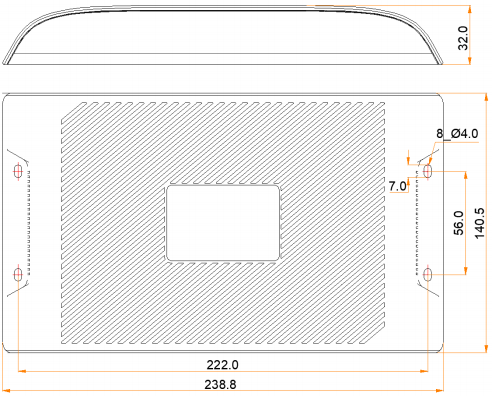
| Physical Specifications | Dimensions | 238.8 mm × 140.5 mm × 32.0 mm |
| Net weight | 430.0 g | |
| Gross weight | 860.8 g Note: It is the total weight of the product, printed materials and packing materials packed according to the packing specifications. | |
| Packing Information | Dimensions | 385.0 mm × 280.0 mm × 75.0 mm |
| List | 1x TB40 1x Wi-Fi omnidirectional antenna 1x Power adapter 1x Quick Start Guide | |
| IP Rating | IP20 Please prevent the product from water intrusion and do not wet or wash the product. | |
| System Software | Android 11.0 operating system software Android terminal application software FPGA program Note: Third-party applications are not supported. | |